
The best Thermal Cameras for Iphone offer a practical way to turn a mobile device into a reliable inspection tool that helps me detect heat differences, identify hidden issues and make informed decisions with ease.
These devices are great because they combine portability, real time imaging and useful analysis features into a setup that fits naturally into everyday use, whether for home inspections, electrical checks or general diagnostics.
In this guide, I will walk through the key features to look for, share top picks based on performance and usability, explain what to consider when choosing the right option and answer common questions to help guide a confident purchase.
Overview of the Best Thermal Cameras for Iphone:
- Fluke TC01A iSee Mobile Thermal Camera — Best overall
- P3 Thermal Camera for iOS — Best value for versatility
- REVASRI Thermal Camera for iPhone — Best budget friendly option
- TOPDON TC002 Thermal Camera — Best performance and features balance
- FLIR ONE Pro LT Thermal Imaging Camera — Best professional grade imaging
- TOPDON TC002C Duo Thermal Camera — Best for newer devices with USB C compatibility
- FLIR ONE Thermal Imaging Camera for iPhone — Best entry level option with reliable basics
Best Thermal Cameras for Iphone
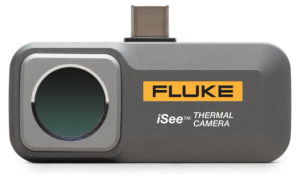
1) Fluke TC01A iSee Mobile Thermal Camera
Check Price in Amazon
The Fluke TC01A 25Hz iSee Mobile Thermal Camera brings a level of precision that feels closer to professional equipment than a typical mobile accessory. When looking at the thermal cameras for iPhone, what stands out here is the clarity of its imaging. With a 256 by 192 thermal resolution, it delivers detailed visuals that allow you to actually interpret heat patterns instead of guessing them. Whether you are checking wiring, spotting insulation gaps, or diagnosing heat loss, the image quality supports confident decisions.
It also handles a wide temperature range, reaching up to 550°C, which opens it up to more serious tasks. This is not limited to casual home use. It can step into environments like electrical inspections, HVAC troubleshooting, or even underfloor heating checks without feeling out of place. The ability to perform full temperature range analysis with spot, line, and area measurements gives you more control over what you are observing, making it easier to pinpoint exact problem areas.
Using it feels immediate and intuitive. It is small, portable, and starts up almost instantly, which matters when you need quick readings without setting up bulky equipment. Real time image sharing adds another layer of usefulness, especially if you are collaborating or need a second opinion. You can capture and communicate findings as they happen, which makes the process smoother and more practical in real world situations.
For anyone exploring the best Thermal Cameras for iPhone, this model offers a balance between professional level performance and everyday usability. It does not feel like a compromise. It feels like a tool designed to bring serious thermal imaging into a mobile workflow.
Pros
- High resolution thermal imaging for clear and detailed results
- Wide temperature range suitable for multiple applications
- Real time sharing makes collaboration easier
- Compact size makes it easy to carry and use anywhere
- Fast startup saves time in urgent situations
Cons
- Advanced features may take time for beginners to fully understand
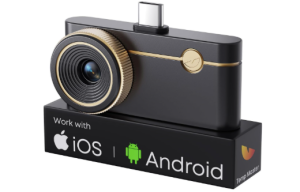
2) P3 Thermal Camera for iOS
Check Price in Amazon
The P3 Thermal Camera for iOS is one of the best Thermal Cameras for iPhone because it makes thermal imaging feel simple from the start. It works with iOS, Android, and Windows devices, which gives you flexibility across different setups. You do not need to create an account or go through a long setup process. You plug it in and begin scanning. It also comes with a Lightning adapter for older iPhones and an extension cable that helps you reach tight or hidden spaces with ease.
The image quality is clear and reliable. It enhances its resolution to produce sharper visuals, which helps you see smaller heat differences more easily. This matters when you are checking for overheating parts, small electrical faults, or heat leaks. The camera is sensitive enough to detect very slight temperature changes, giving you confidence in what you are seeing instead of second guessing the results.
It also gives you more control during use. The manual focus lens allows you to switch between close inspections and mid range viewing without losing clarity. This makes it useful for tasks like inspecting electronics, checking walls, or scanning a wider area. The 25Hz refresh rate keeps the image smooth as you move, so you can scan quickly without blur slowing you down.
The temperature range supports both everyday and demanding tasks. You can measure low and high temperatures with consistent accuracy. The app adds helpful tools like temperature alerts and hot spot tracking, which make it easier to identify issues quickly. Since it draws power from your phone, you do not need extra batteries, which keeps it portable and easy to carry.
Disclosure: I may earn a commission if you buy through this affiliate link.
Pros
- Works with iPhone, Android and Windows devices
- Clear image quality that shows small details
- Manual focus supports different inspection distances
- Smooth real time scanning with minimal lag
- No battery needed which improves portability
- Helpful app tools for faster problem detection
Cons
- Some features may take time to learn
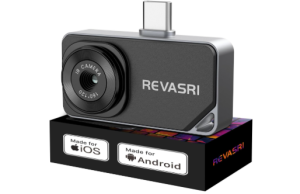
3) REVASRI Thermal Camera for iPhone
Check Price in Amazon
The REVASRI Thermal Camera for iPhone is built for users who want a simple and flexible way to get into thermal imaging. It works across iOS, Android, and Windows devices, which makes it easy to switch between different platforms if needed. Setup is quick. You scan the QR code, install the app, and plug it in. From there, you can begin scanning without delays, which makes it practical for both quick checks and longer inspections.
The image quality is clear enough for most everyday and technical tasks. It enhances visuals to a 320 by 240 resolution, giving you sharper results that help you notice temperature differences more easily. The 25Hz refresh rate keeps the image smooth as you move the camera, so you can scan spaces without lag. Its thermal sensitivity allows you to detect small changes in temperature, which is useful when identifying heat leaks or checking for abnormal readings in equipment.
It also gives you a wide temperature range, which supports both low and high readings with reliable accuracy. You can switch between different color modes to better understand what you are seeing. This makes it easier to interpret heat patterns depending on the situation. Whether you are working indoors or outdoors, the display adjusts to give you a clearer picture of the problem.
The extra features add more control during use. You get temperature tracking, alerts for high and low readings, and digital zoom to focus on specific areas. The picture in picture function allows you to combine thermal and visible images, which helps you understand exactly where the issue is. Its compact size makes it easy to carry, so you can use it for home inspections, HVAC checks, electrical panels, or even automotive troubleshooting without feeling weighed down.
Disclosure: I may earn a commission if you buy through this affiliate link.
Pros
- Works with iOS, Android, and Windows devices
- Clear image quality with improved resolution
- Smooth scanning with a stable refresh rate
- Wide temperature range for different applications
- Multiple color modes for easier image interpretation
Cons
- Digital zoom may reduce image sharpness at higher levels
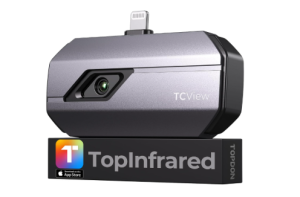
4) TOPDON TC002 Thermal Camera
Check Price in Amazon
The TOPDON TC002 Thermal Camera is built for iOS devices with a Lightning port, making it a focused option for users who want thermal imaging directly on their iPhone or iPad. Setup is simple. You install the TopInfrared app, connect the device, and start scanning. The plug and play design removes extra steps and helps you begin quickly without technical delays.
Image quality is clear and consistent thanks to super resolution technology that upgrades the native 256 by 192 input into a sharper 512 by 384 output. This allows you to see temperature differences with better detail. The 25Hz refresh rate keeps the image smooth as you move, which reduces flicker and makes real time scanning easier. Adjustable sharpness and contrast also help improve visibility depending on the environment you are working in.
Temperature measurement is broad and reliable. It supports a wide range that covers both low and high temperatures, making it suitable for different inspection tasks. You can measure temperature using point, line, and surface modes, which gives you flexibility when analyzing heat patterns. The thermal sensitivity allows the device to detect small changes in temperature, which is useful when identifying electrical issues, insulation gaps, or mechanical faults.
When considering the best Thermal Cameras for Iphone, this model offers a balanced mix of clarity, control, and portability. It supports viewing from a safe distance, which allows you to inspect areas without getting too close. Features like picture in picture mode combine thermal and visible views to give better context. Its compact size makes it easy to carry, and it remains comfortable to use during longer inspection sessions.
Pros
- Clear thermal imaging with improved resolution
- Smooth scanning with a stable 25Hz refresh rate
- Wide temperature range for different use cases
- Multiple measurement modes for flexible analysis
- Simple plug and play setup with iOS devices
- Portable design that is easy to carry
- Useful app features that support detailed inspection
Cons
- Limited to iOS devices with Lightning ports
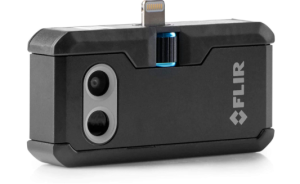
5) FLIR ONE Pro LT Thermal Imaging Camera
Check Price in Amazon
The FLIR ONE Pro LT Thermal Imaging Camera is designed for iOS devices with a Lightning port, making it a practical option for users who want to add thermal imaging to their iPhone. It connects directly to compatible devices and works with a dedicated app that lets you capture, view, and manage thermal images. The FLIR Ignite Cloud also allows you to upload and organize images, which helps when handling multiple inspections or sharing results.
Image quality comes from a combination of visual and thermal output. It delivers a 1440 by 1080 visual resolution alongside an 80 by 60 thermal resolution, enhanced by FLIR processing that improves clarity. This combination helps you see both the heat patterns and the surrounding details. The MSX feature adds visible details onto thermal images, making edges and shapes easier to recognize when identifying objects or problem areas.
Temperature measurement is accurate within a practical working range. It supports common inspection tasks such as electrical checks, HVAC diagnostics, building inspections, and moisture detection. You can use it to spot heat loss, detect faulty components, or monitor equipment conditions. The readings remain consistent enough to guide decisions during real world use.
The build is strong enough for regular jobsite conditions. It can handle drops from moderate heights and is designed to support daily field work. Its compact size makes it easy to carry and attach to your phone, while the adjustable connector helps it fit securely with different devices. For anyone exploring the best Thermal Cameras for Iphone, this model offers a reliable mix of usability, durability, and performance for both professional and personal use.
Pros
- Clear combined visual and thermal imaging for easier interpretation
- MSX technology improves detail and object recognition
- Reliable temperature accuracy for practical inspections
- Works with iOS devices that use a Lightning port
- Cloud support for storing and sharing images
- Durable design suited for jobsite conditions
Cons
- Lower thermal resolution compared to higher end options
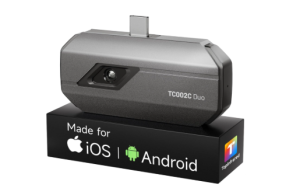
6) TOPDON TC002C Duo Thermal Camera
Check Price in Amazon
The TOPDON TC002C Duo Thermal Camera is built for modern devices that use USB C, making it compatible with the latest iPhones, Android phones, and tablets. This flexibility allows it to work across different platforms without needing multiple devices. Setup is simple. You connect it using the appropriate cable and use the TopInfrared app to begin scanning. The plug and play design keeps the process quick, so you can focus on capturing thermal data instead of dealing with complicated setup steps.
Image clarity is improved through super resolution technology, which enhances the native 256 by 192 thermal input into a sharper 512 by 384 output. This makes it easier to see fine temperature differences and identify issues with more precision. The 25Hz refresh rate keeps the image smooth while scanning, which helps maintain a steady view during movement. Combined with high thermal sensitivity, the device can detect small heat variations that are often important when diagnosing electrical systems, mechanical components, or insulation issues.
The temperature range is wide, allowing it to measure both low and high temperatures with consistent accuracy. It supports real time waveform display, which shows how temperatures change over time, giving you a deeper understanding of what is happening in a system. You can also customize temperature limits and use color displays to highlight variations more clearly. This makes it easier to interpret results in different environments, whether you are working on home inspections, HVAC systems, or automotive diagnostics.
When considering the best Thermal Cameras for Iphone, this model stands out for its balance of portability, compatibility, and performance. It allows temperature readings from a safe distance, which improves safety during inspections. Its compact and lightweight design makes it easy to carry, while still offering professional level functionality. With support for photo and video recording, it also helps document findings for reporting or analysis. The combination of accuracy, ease of use, and cross device compatibility makes it a practical choice for both professionals and everyday users.
Pros
- Works with USB C devices including iPhone, Android and tablets
- High resolution imaging with improved clarity through super resolution
- Smooth real time scanning supported by a 25Hz refresh rate
- Wide temperature range suitable for many applications
- Accurate readings with high thermal sensitivity
- Supports photo and video recording for documentation
Cons
- Requires the TopInfrared app to operate
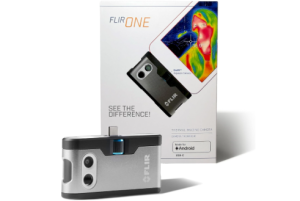
7) FLIR ONE Thermal Imaging Camera for iPhone
Check Price in Amazon
The FLIR ONE Thermal Imaging Camera is designed for iPhones with a Lightning port, making it compatible with models up to iPhone 14 and earlier. It connects directly to the phone and works through the FLIR One app, allowing you to begin thermal scanning quickly. The setup is straightforward, and the app provides guided tools that help users perform inspections without needing advanced technical knowledge. This makes it suitable for both beginners and professionals who want reliable thermal imaging on a mobile device.
Image quality is enhanced through a combination of VividIR processing and MSX technology. VividIR improves the native 80 by 60 thermal resolution up to 240 by 180, giving you clearer and more detailed images. MSX adds visible light details to thermal images in real time, helping you recognize edges, shapes, and objects more easily. This combination allows you to interpret what you are seeing with better context, which is especially useful when identifying issues in electrical systems, HVAC units, or building structures.
The camera provides accurate temperature readings within a defined range, making it dependable for practical inspection tasks. It supports applications such as detecting air leaks, identifying moisture buildup, checking insulation performance, and diagnosing automotive or mechanical problems. The FLIR One app includes inspection guides that walk you through common scenarios, which helps improve accuracy and confidence during use. You can also capture images and videos, then upload them to FLIR Ignite cloud storage for easy access, organization, and sharing.
Durability is another important aspect. The device is built to handle regular jobsite conditions and can withstand drops from moderate heights, which adds reliability for field use. Its compact design allows it to attach easily to your phone without adding much bulk, making it convenient to carry and use on the go. When considering the best Thermal Cameras for Iphone, this model offers a balanced mix of image enhancement, guided usability, and practical performance for a wide range of inspection tasks.
Pros
- Clear thermal images enhanced by VividIR and MSX technology
- Guided inspection features within the app for easier use
- Reliable temperature accuracy for common inspection scenarios
- Supports image and video capture with cloud storage options
- Durable design suitable for jobsite conditions
- Compact and easy to attach to compatible iPhones
Cons
- Only compatible with iPhones that use a Lightning port
Explore more: 10 Best Thermal Cameras under 200