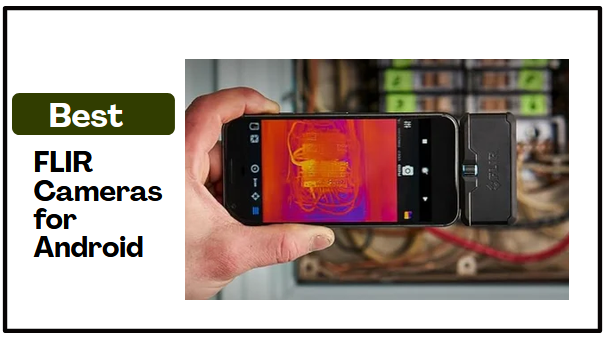
Using an Android phone for thermal imaging gives you a convenient way to investigate temperature differences without carrying a separate handheld camera. However, the best FLIR Cameras for Android do not all offer the same experience. Some connect directly through USB C, while others work wirelessly, and differences in thermal resolution, measurement tools, battery life, and compatibility can affect their practicality during an inspection.
In this guide, I look at four FLIR cameras for Android and explain how their thermal performance, connection methods, measurement capabilities, practical design, and Android requirements affect everyday use. I also cover the advantages and factors worth considering before you buy.
I’ll also answer common questions about Android compatibility, temperature measurement, direct and wireless connections, and using thermal imaging to investigate potential moisture problems. That gives you a clearer basis for comparing the cameras and deciding which features matter most for your intended use.
That said, let’s dive in.
Our Top Picks at a Glance
Here are the four FLIR cameras covered in this guide, with each one highlighted for the feature or use case that defines its appeal.
- Flir One Thermal Imaging Camera for Android USB-C — Best for Compact Direct Connection
- Flir One Pro Thermal Imaging Camera for Android USB-C — Best for Higher Thermal Detail
- Flir Edge – Wireless Bluetooth Thermal Imaging Camera — Best for Wireless Positioning
- Flir Edge Pro Wireless Thermal Imaging Camera — Best for Wireless Thermal Detail
How We Tested the Best FLIR Cameras for Android
We compared the FLIR ONE, ONE Pro, Edge, and Edge Pro using FLIR’s published specifications, compatibility guidance, and product documentation. Our evaluation focused on the features that determine how practical each camera is for Android based thermal inspections.
For image performance, we compared each camera’s native thermal resolution, VividIR output, MSX enhancement, and thermal sensitivity. We considered native resolution when assessing the amount of thermal detail captured by each sensor, while VividIR and MSX helped us evaluate how that information is presented for easier interpretation. We also considered field of view and focus specifications where available.
As for temperature measurement, we examined each camera’s stated measurement range, accuracy, and available measurement tools. We considered whether each model provides a centered spot measurement or additional options such as hottest, coldest, and multiple spot measurements. This helped us distinguish basic thermal viewing from models that offer greater flexibility when investigating temperature differences.
We assessed connectivity by comparing the direct USB C connection of the FLIR ONE and ONE Pro with the wireless design of the Edge and Edge Pro. We checked the stated Android requirements, including USB OTG support and supported architecture for the ONE models, Android 13 or later for the Edge, and Android 11 or later for the Edge Pro.
For practical use, we compared battery life, weight, drop protection, mounting options, and environmental protection. We also examined software features such as Home Inspect, measurement tools, FLIR Ignite, and other available inspection functions to determine how each camera supports the workflow beyond capturing a thermal image.
Finally, we considered how each camera’s combination of thermal detail, connectivity, measurement capability, and physical design applies to different inspection situations. This allowed us to assess the cameras according to the factors that matter most when using thermal imaging with an Android device.
Best FLIR Cameras for Android
1) Flir One Thermal Imaging Camera for Android USB-C
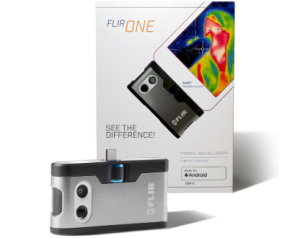
If you want to add thermal imaging to your Android phone without carrying a separate handheld camera, the FLIR ONE takes a straightforward approach. It plugs directly into a compatible USB-C port and sends the thermal view to your phone through the FLIR ONE app. That makes it practical for checking areas around the home, troubleshooting HVAC issues, inspecting electrical components, or looking for signs of water damage.
Its 80 × 60 native thermal resolution is supported by VividIR processing, which FLIR says combines multiple images to improve thermal detail. MSX then adds visual information to the thermal image, making it easier to identify where a heat pattern is located rather than viewing an isolated patch of color. The camera also includes a centered spot meter for temperature readings.
For everyday inspection, its small size is another practical advantage. At about 36 g, the FLIR ONE adds little weight to a phone-based setup, while the adjustable OneFit connector extends to accommodate many protective cases. The camera is also rated for a 1.5-meter drop.
However, the direct-connection design makes phone compatibility an important part of the buying decision. FLIR specifically advises checking the phone model and connector before purchase rather than assuming that any USB-C Android device will work. The wider compatibility requirements also include USB OTG and supported 64-bit architecture.
The FLIR ONE has an approximately one-hour battery life and measures objects from -20°C to 120°C according to FLIR’s current specifications. Its stated measurement accuracy is ±3°C or ±5% under specified conditions. Those limits make it more appropriate for routine inspection and troubleshooting than applications involving temperatures outside its measurement range.
Specifications
- Connection: USB-C
- Native thermal resolution: 80 × 60
- VividIR resolution: 240 × 180
- Temperature range: -20°C to 120°C
- Accuracy: ±3°C or ±5% under specified conditions
- Focus: Fixed, 15 cm to infinity
- Battery life: Approximately 1 hour
- Weight: 36.3 g
- Drop rating: 1.5 m
Pros
- Direct USB-C connection
- Compact and lightweight
- VividIR image processing
- MSX visual detail enhancement
- OneFit adjustable connector
- Useful inspection applications
- 1.5-meter drop rating
Cons
- Phone-specific compatibility requirements
2) Flir One Pro Thermal Imaging Camera for Android USB-C
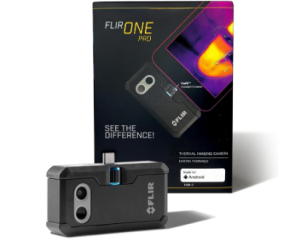
When you need more thermal detail from an Android phone, the FLIR ONE Pro offers a higher-resolution option. It connects directly to your phone instead of requiring a separate handheld camera. Its 160 × 120 native thermal resolution gives it four times the native resolution of the FLIR ONE. VividIR processing also produces a 480 × 360 super-resolution image. This extra detail is useful for inspecting electrical panels, HVAC systems, mechanical equipment, and other areas where smaller temperature differences need closer examination.
The FLIR ONE Pro also offers more measurement flexibility than the standard model. It supports hottest, coldest, and three spot measurements. Its 70 mK thermal sensitivity helps it capture subtle temperature differences. MSX combines thermal information with visible image detail. This makes heat patterns easier to relate to the physical object you’re examining.
For inspection work, the Pro’s temperature range extends from -20°C to 120°C. A second range reaches 400°C under specified measurement conditions. FLIR states an accuracy of ±3°C or ±5% under its stated operating conditions. The wider upper range gives the camera more flexibility for hotter components. However, the 400°C range has specific measurement requirements that buyers should keep in mind.
The direct USB-C design keeps the setup compact. Its adjustable OneFit connector also accommodates different phone thicknesses. At around 36.5 g, the camera remains lightweight for phone-based inspections. It has an approximately one-hour battery life, so longer inspection sessions require some attention to charging.
There is one important step before buying: verify your particular Android phone. FLIR offers a dedicated Android USB-C version and advises checking the phone model and connector before purchase. Its support documentation also notes connectivity issues with some Android devices and chipsets. Therefore, having a USB-C port alone does not guarantee compatibility.
For someone who wants a direct Android thermal camera, the FLIR ONE Pro offers more image detail than the entry-level option. It also provides greater measurement flexibility. Its compact design keeps the workflow phone-based. Meanwhile, the higher native resolution and expanded measurement tools make it useful when interpreting finer thermal patterns matters.
Specifications
- Connection: USB-C
- Native thermal resolution: 160 × 120
- Super resolution: 480 × 360
- Thermal sensitivity: 70 mK
- Object temperature range: -20°C to 120°C; 0°C to 400°C
- Accuracy: ±3°C or ±5% under specified conditions
- Battery life: Approximately 1 hour
- Weight: 36.5 g
- Drop rating: 1.5 m
Pros
- Higher native thermal resolution
- 480 × 360 VividIR processing
- 70 mK thermal sensitivity
- Multiple spot measurement options
- Direct USB-C connection
- Adjustable OneFit connector
- Wider temperature measurement capability
- Compact and lightweight
Cons
- Android compatibility varies by phone model and chipset
- Approximately one-hour battery life limits longer inspection sessions
3) Flir Edge – Wireless Bluetooth Thermal Imaging Camera
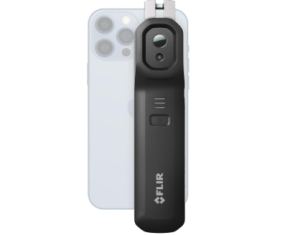
If attaching a thermal camera directly to your phone feels restrictive, the FLIR Edge gives you more freedom to position the camera. Its wireless design lets you view the thermal feed on a compatible Android device while holding the camera separately. This makes it useful for inspecting areas that are difficult to see or reach with a phone attached. You can also clip the camera onto your phone or tablet for one-handed operation when a conventional setup makes more sense.
The camera uses an 80 × 60 native thermal sensor and produces a 240 × 180 super-resolution image. MSX adds visible details to the thermal view. This helps you identify the physical location of a heat pattern rather than relying on the thermal image alone. It also provides hottest, coldest, and three spot measurements. These options give you more ways to examine temperature differences during an inspection.
That wireless flexibility becomes particularly useful when inspecting tight or obstructed spaces. FLIR states that the Edge can operate remotely from the smart device at distances of up to 5 meters. You can position the camera near a target while keeping the phone somewhere more comfortable for viewing the live image.
Battery life is another advantage for longer inspection sessions. The Edge is rated for approximately 2.5 hours of operation and supports fast charging. Its 2-meter drop rating and IP54 protection also provide more physical protection for field use. However, IP54 protection does not make the camera waterproof.
Android compatibility still deserves attention before purchase. FLIR currently lists Android 13 or later for the Edge. The company also directs buyers to check their specific device for compatibility. That step matters because wireless connectivity depends on both the camera and the mobile device. Therefore, having an Android phone alone does not guarantee support.
The FLIR Edge makes the most sense when camera positioning matters as much as the thermal image itself. Its resolution suits general inspection, while the detachable wireless design gives you more freedom to examine hard-to-reach or out-of-view areas. You can do so without keeping the camera physically attached to your Android device.
Specifications
- Connection: Wireless
- Native thermal resolution: 80 × 60
- Super resolution: 240 × 180
- Temperature range: -20°C to 120°C
- Accuracy: ±3°C or ±5% under specified conditions
- Battery life: Approximately 2.5 hours
- Remote operating distance: Up to 5 m
- Drop rating: 2 m
- IP rating: IP54
Pros
- Wireless camera positioning
- Remote operation up to 5 m
- 240 × 180 super resolution
- MSX image enhancement
- Multiple temperature measurement options
- Approximately 2.5-hour battery life
- 2-meter drop rating
- IP54 protection
Cons
- Android 13 or later required
4) Flir Edge Pro Wireless Thermal Imaging Camera
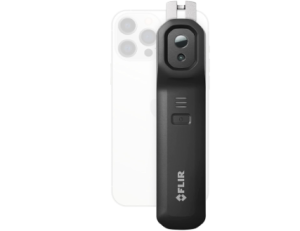
The FLIR Edge Pro combines wireless camera positioning with a 160 × 120 native thermal sensor. This gives you more thermal detail while allowing you to hold the camera separately from your Android phone or mount it where you need to inspect. That flexibility is useful when examining awkward spaces, equipment, or areas that are difficult to view with a phone-mounted camera.
Its 480 × 360 VividIR processing further enhances the thermal image. MSX also adds visible details to help identify the physical location of temperature differences. The Edge Pro offers a 70-degree field of view and 150 mK thermal sensitivity. Together, these features provide a broader view of the inspection area while retaining useful thermal information.
Because the camera works wirelessly, you can position it separately from your Android device. This setup is useful when examining awkward spaces, equipment, or areas that are difficult to view while holding a phone-mounted camera. You can also use the Edge Pro handheld or mount it when keeping the camera stationary makes more sense.
The camera has a 2-meter drop rating and a rechargeable battery that provides roughly two hours of continuous use. It also works with FLIR Ignite for storing, organizing, and sharing thermal images. These features make the Edge Pro practical for longer inspection sessions where moving between different areas matters more than keeping the setup as compact as possible.
Android compatibility needs careful attention before purchase. The stated requirement is Android 11 or later, so an Android phone with wireless connectivity is not automatically sufficient. You should check your specific device before buying. Customer reports supplied with the product also describe connection delays, disconnections, and live-feed lag on some Android setups. These reports are worth considering when real-time viewing is important.
For someone comparing the best FLIR Cameras for Android, the Edge Pro brings together two useful priorities: higher thermal resolution and the freedom to position the camera separately from the phone. Its Android requirement and reported connectivity experiences are important considerations. However, the combination makes it useful for users who need more detail without giving up wireless positioning.
Specifications
- Connection: Wireless
- Android requirement: Android 11 or later
- Native thermal resolution: 160 × 120
- VividIR resolution: 480 × 360
- Thermal sensitivity: 150 mK
- Temperature range: 5°C to 120°C
- Accuracy: ±3°C or ±5% under specified conditions
- Battery life: Approximately 2 hours
- Drop rating: 2 m
Pros
- 160 × 120 native thermal resolution
- 480 × 360 VividIR processing
- MSX image enhancement
- Handheld or mounted operation
- Approximately 2-hour battery life
- 2-meter drop rating
- FLIR Ignite support
- Wireless camera positioning
Cons
- Requires Android 11 or later
- Reported Android connection and live-feed issues
See more: 3 Best Reflex Sights for Astigmatism
Advantages of the Best FLIR Cameras for Android
Spot Problems That Are Hard to See
The best FLIR Cameras for Android reveal temperature differences that a normal phone camera cannot detect. This gives you another way to spot unusual hot or cold areas and decide where a closer inspection is needed.
Make Thermal Inspections More Convenient
Using an Android phone as the viewing screen keeps thermal inspections within a familiar device. Directly connected models provide a compact setup, while wireless models let you move the camera independently when the inspection calls for more flexibility.
Understand What the Thermal Image Shows
Thermal images can be difficult to interpret without visual context. Features such as MSX and VividIR add image detail that helps you connect temperature patterns with the physical object you are examining, making the best FLIR Cameras for Android easier to use during practical inspections.
Inspect Hard to Reach Areas
A wireless FLIR camera gives you more freedom when a target is behind equipment, inside a tight space, or otherwise difficult to view with a phone and camera together. You can position the camera closer to the area you want to examine while keeping the phone somewhere more convenient.
Investigate Potential Problems Sooner
Thermal imaging gives you a practical way to investigate unusual heat around electrical components, HVAC systems, mechanical equipment, or areas where moisture problems may be suspected. An abnormal temperature pattern can help you identify where further inspection is warranted.
Next read: 10 Best Thermal Scopes
Factors to Consider When Choosing the Best FLIR Cameras for Android
Android Compatibility
Before buying, verify that the camera supports your specific Android phone. The direct USB C models have particular requirements involving the phone’s USB C port, USB OTG support, and supported device architecture. The wireless models also have their own Android requirements, so an Android phone with wireless connectivity is not automatically compatible.
Connection Type
Consider how you want to use the camera during an inspection. A direct USB C connection keeps the camera attached to the phone, which creates a compact setup for straightforward checks. A wireless model separates the camera from the phone, giving you more freedom to position it independently when the inspection requires a different viewing angle.
Thermal Resolution and Image Detail
Thermal resolution affects how much detail the camera captures in its native thermal image. The 80 × 60 models are suitable for general thermal inspection, while the 160 × 120 models provide more native detail for examining smaller or more closely spaced temperature differences. VividIR and MSX can further enhance how the thermal information is presented, but they do not replace the detail captured by the native sensor.
Temperature Range and Measurement Capability
Think about the temperatures you expect to encounter and how precisely you need to investigate them. A wider measurement range becomes more useful when inspecting hotter components, while features such as hottest, coldest, and multiple spot measurements provide more flexibility than relying on a single centered reading.
Inspection Environment
Your typical inspection environment should influence the camera you choose. Consider whether you will examine electrical panels, HVAC systems, mechanical equipment, moisture related areas, or tight and obstructed spaces. The physical design, camera positioning options, and environmental protection of each model become more relevant when the inspection conditions are less straightforward.
Battery Life and Inspection Workflow
Consider how long your typical inspection takes and whether you need the camera available for repeated checks throughout the day. The direct connection models provide roughly an hour of battery life, while the wireless models offer around two or more hours. Longer sessions therefore make battery capacity a more important part of the decision.
Software and Inspection Tools
Look beyond the thermal image itself when comparing models. Features such as Home Inspect, measurement options, MSX, VividIR, and FLIR Ignite can affect how you capture, interpret, organize, and share inspection information. Choose the tools that match how much you want the camera to support your workflow after the image is captured.
Durability and Physical Design
Consider how the camera will be handled and where you expect to use it. Weight, drop protection, mounting options, connector design, and environmental protection can all affect day to day practicality. A lightweight direct connection camera may make sense for quick checks, while a more robust wireless model can be useful when the camera needs to be positioned separately or handled more frequently.
FAQs About the Best FLIR Cameras for Android
Will a FLIR Camera Work With Any Android Phone?
No. Android compatibility means the camera can connect to your specific phone and work properly with its operating system, connection type, and hardware requirements. Direct USB C models may require USB OTG support and a supported 64 bit architecture, while wireless models have their own Android version and device requirements. Check your phone against the camera’s current compatibility information before buying.
What Can a FLIR Camera Show That a Normal Phone Camera Cannot?
A FLIR camera detects infrared radiation and displays differences in surface temperature. This can reveal unusual hot or cold areas that are not visible in a normal photograph, helping you identify areas that may need closer inspection.
What Is the Difference Between a Direct USB C and Wireless FLIR Camera?
A direct USB C model attaches to the Android phone, creating a compact setup where the phone serves as the viewing screen. A wireless model communicates with the phone without requiring the camera to remain physically attached, allowing you to position the camera separately when needed.
Can FLIR Cameras Measure Temperature?
Yes. Temperature measurement lets you move beyond simply seeing a heat pattern and check how hot or cold a specific area is. Depending on the model, you can measure a single point or use hottest, coldest, and multiple spot readings to investigate temperature differences across an object. Each camera has a stated measurement range and accuracy that determines what readings it can provide.
Can a FLIR Camera Detect Water or Moisture Problems?
Thermal imaging can help identify temperature patterns associated with suspected moisture or water problems. However, a thermal camera does not directly detect water itself. An unusual thermal pattern should be treated as an indication for further investigation rather than proof of a moisture problem.
Conclusion
Having read through everything in this article, you now have a clearer picture of what to look for in a FLIR camera for Android and how the different models approach thermal imaging. The choice is not simply about getting the camera with the most features. It is about finding the combination of image detail, connection style, measurement options, and practical design that fits the way you intend to use it.
Whether you are checking your home, investigating HVAC or electrical issues, or carrying out more detailed inspections, the right camera should fit naturally into that work. Taking your Android device, inspection needs, and expected working conditions into account will help you narrow down the options with greater confidence.